Akhirnya Canon IP1000 dapat dijalankan ke Ubuntu 7.10 |
Akhirnya....Setelah seringkali masalah printer khusunya printer canon (khusunya seri IP1000, 1200, dkk..) membuat kita malas buat pindah ke Ubuntu karena takutnya benar-benar buntu... thanks to takushi dengan personal debiannya akhirnya dapat membuat yakin bahwa linux bukan sumber masalah, tapi sumbernya solusi...:-) Berikut ini tutorial untuk mengaktifkan printer Canon anda..: ketik pada terminal: $sudo gedit /etc/apt/sources.list 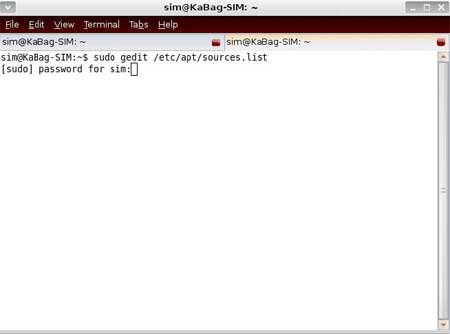 tambahkan 2 baris ini: deb http://www.backports.org/debian sarge-backports main deb http://mambo.kuhp.kyoto-u.ac.jp/~takushi/debian ./ simpan dan tutup sources.list ketik pada terminal: apt-get update (tunggu sampai proses selesai.) kemudian setelah update selesai, yang perlu kita install adalah: untuk printer Canon Pixus 550i / 850i / 950i (i550 / i850 / i950) and iP90 pada terminal ketik : # apt-get install libcnbj-2.2 bjfilter-2.2 pstocanonbj (tunggu sampai proses selesai..) Untuk printer Canon Pixus 560i / 860i / 960i (i560 / i860 / i960) pada terminal ketik : # apt-get install libcnbj-2.4 bjfilter-2.4 pstocanonbj (tunggu sampai proses selesai...) 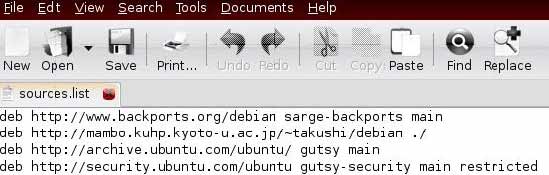 Untuk printer Canon Pixus iP3100 / iP4100 / iP8600 (and Pixma iP1000 / iP1500) pada terminal ketik: # apt-get install libcnbj-2.5 bjfilter-2.5 pstocanonbj (tunggu sampai proses selesai...) Untuk printer Canon Pixus iP2200 / iP4200 / iP6600D / iP7500 / MP500 Driver pada terminal ketik: # apt-get install libcnbj-2.6 bjfilter-2.6 pstocanonbj (tunggu sampai selesai...) 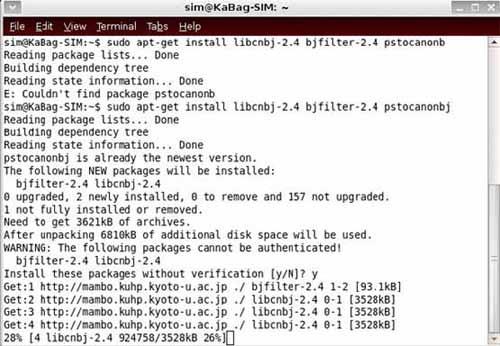 Untuk printer EPSON Color LASER Printers buka sources.list, edit tambahkan baris : deb http://kmuto.jp/debian/mtu debian_dic main contrib non-free 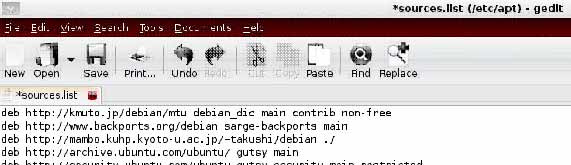 simpan dan tutup sources.list dan kemudian pada terminal ketik: $sudo apt-get update (tunggu proses selesai) printer Epson laser color yang bisa disupport: • LP-9800C • LP-9500C • LP-9200C • LP-9000C • LP-8800C • LP-8500C • LP-8300C • LP-8200C • LP-8000C • LP-3000C install paket diatas dengan perintah pada terminal : # apt-get install cupsys foomatic-filters eplaser-opvp source: http://www.ubb.ac.id/menulengkap.php?judul=Akhirnya%20Canon%20IP1000%20dapat%20dijalankan%20ke%20Ubuntu%207.10&&nomorurut_artikel=25 |
Tampilkan postingan dengan label SOFTWARE. Tampilkan semua postingan
Tampilkan postingan dengan label SOFTWARE. Tampilkan semua postingan
Senin, 18 April 2011

Daftar Software Program-program Komputer untuk Windows - Linux |
Salah satu kesulitan terbesar ketika melakukan perpindahan (Migrasi) dari sistem operasi Windows ke Linux adalah permasalahan minimnya pengetahuan kita tentang software yang sering atau biasa kita gunakan sehari-hari. Biasanya orang akan mencari software Windows yang menggunakan analogi Linux, walaupun seringkali para user linux tidak dapat menjumpai kebutuhan mereka yang disebabkan minimnya pengetahuan tentang sistem pemrogaman pada Windows. Tabel berikut ini mudah-mudahan dapat sedikit membantu kita yang akan atau sudah melakukan migrasi dari Windows ke Linux untuk menemukan software-software yang sesuai dengan kebutuhan mereka. Tabel ini selalu mengalami perubahan sesuai dengan perkembangan aplikasi software yang terus diperbaharui setiap saat. Apabila anda ingin berpartisipasi dalam program ini untuk menambah sejumlah aplikasi yang relevan, silahkan mengirim email anda ke winlintable[a]linuxrsp.ru dengan mencantumkan nama programnya, Sistem Operasi, penjelasan program (misalnya tujuan program tersebut), dan sebuah link ke official website dari developer program tersebut (bila mengetahuinya). Komentar-omentar, perbaikan, penawaran dan pelaporan terhadap adanya celah atau kelemahan (Bug) juga dapat dikirimkan melalui email iniwinlintable[a]linuxrsp.ru. Catatan :
Perbedaan mendasar antara Windows dan Linux Hampir semua program-program Windows dibuat berdasarkan prinsip "All-in-One", dimana masing-masing developer software membuat source code mereka sendiri-sendiri, prinsip ini sering disebut dengan "Windows-way". Sedangkan pada Unix/Linux , sebuah komponen atau suatu program harus mengeksekusi satu tugas saja, tetapi dengan pengeksekusian yang baik ("UNIX-Way"). Program-program yang dibuat bagi Linux dapat dibayangkan sebagai sebuah blok dari bangunan LEGO, contohnya jika ada sebuah program untuk memeriksa ejaan maka program inipun dapat digunakan oleh program text editor atau email client; atau jika ada sebuah program untuk medownload dalam bentuk baris-baris perintah (command lines program) maka secara sederhana orang dapat pula membuat sebuah program seperti ini berdasarkan visualisasi /desktop/Front-End (graphic interface program). Prinsip-prinsip ini sangat penting untuk diketahui disaat kita hendak mencari suatu analogi dari program-program Windows pada Linux. Untuk informasi lebih lengkap silahkan baca bukunya "Linux and the Unix Philosophy" yang pada salah satu babnya membahas secara khusus mengenai filosofi perbedaan diantara Windows dan Linux ini. Bagi yang tertarik dalam software-software Windows : 1) Pada baris Windows pada tabel ini bukanlah yang Utama, itulah mengapa sebabnya tabel ini secara absolute tidak berisi seluruh software yang ada, akan tetapi hanya berisi daftar software yang terkenal dan terbaik saja. 2) Banyak program-program Linux yang dapat dijalankan pada Windows baik itu dengan menggunakan CygWin maupun dengan Emulator Linux lainnya. source: http://www.ubb.ac.id/menulengkap.php?judul=Daftar%20Software%20Program-program%20Komputer%20untuk%20Windows%20-%20Linux&&nomorurut_artikel=85 |
New news!
Lagi-Lagi Research In Motion Keluarkan Produk Baru
Posted on 11 November 2010 by author
Kini computer tablet telah menyebar ke dunia dan mulai digandrungi. Produk tersebut adalah dari Apple. Dan sekarang Research In Motion ingin menyaingi Apple dengan produk unggulannya tersebut.
Namanya adalah Playbook dan konon harganya di bawah 500 Dolar Amerika. Namun persisnya berapa belum ada yang tahu, masih rahasia. Dan produk baru ini baru akan diluncurkan awal tahun depan nanti.
Memang Apple dengan produk iPadnya telah membuat heboh dunia. Produk tersebut hanya dalam waktu 80 hari pertama telah terjual sebanyak 3 juta unit. Jenis produk baru ini memang telah sanggup menggusur perhatian public terhadap laptop dan smartphone.
Dan RIM ini tak kalah pintarnya untuk menyaingi Apple. Ia dengan Playbooknya tersebut menawarkan beberapa keunggulan yang tidak bisa dimiliki oleh iPad dari Apple. Playbook ini punya kelebihan mampu untuk animasi yaitu Flash dan bisa untuk video dari Adobe internet juga. Dan lagipula layarnya bisa lebih kecil daripada iPad.
Dan pasaran yang menjadi sasaran utama dan pertama setelah Amerika adalah Korea Selatan. Karena konsumen di sana banyak dan inovatif.
Selasa, 12 April 2011
Google Unveils New Applications
At its annual press day here in the Googleplex, the search giant took the lid off Google Desktop version 4, Google Notebook, Google Trends and Google Co-op.
The new version of Google Desktop lets people use mini-interactive applications from within the product's Sidebar without having to download software or open up a browser, said Marissa Mayer, vice president of search products and user experience.
Mayer led a demonstration in which a song icon was dragged and dropped atop a media player, causing the song to start playing. Similarly, a video clip, titled "Laughing Babies," was dragged onto a player, launching a clip of a mother holding a gaggle of giggling babies.
"Nothing like a biological clock right there in your Sidebar," Mayer joked.
Google Desktop 4 is integrated with other Google products to let people use the Sidebar to, for instance, easily see when their friends' birthdays are via the Orkut social network, or see what events they have on a particular day via Google Calendar. Desktop 4 also synchronizes with other computers so that when a change is made on a person's work machine, it's reflected on the person's home computer, she said.
The software also can be configured to automatically create a customized home page. "It has figured out that I'm a movie buff and that I use eBay and I travel a lot," said Mayer.
Mayer also led a demonstration of Google Notebook, which she said will be available on Google Labs next week. Notebook is designed to let people click a "note this link in the last line of a particular search result and save the result information to a virtual notebook in a pop-up window.
People can also grab text and pictures from Web sites and paste them into Google Notebook, as well as make the notebook full-screen size, drag and drop items to reorganize them, and e-mail the notebook to others. The program requires a plug-in and a Google account.
Google Trends, available immediately on Google Labs, graphs the number of global searches on whatever term a Google user types into the search engine. It also correlates spikes and dips with particular news and offers a bar graph that shows what region, country and language had the most searches on that term.
"If you are an advertiser and you want to understand trends in different geographies," Google Trends can provide useful information, said Jonathan Rosenberg, senior vice president of product management.
He led a demo search on "boxers, briefs" and concluded that "boxers are apparently a little more popular than briefs" and did a search on the names of Google co-founders Larry Page and Sergey Brin and said, "Larry's traffic has clearly spiked."
Google also announced Google Co-op, which will be available next week. The social search service lets self-described experts in a field label or tag Web sites that Google will then include on the main search page. For example, experts can send a particular Web page from the Centers for Disease Control to Google and ask that it be labeled with the "malaria" tag. Users searching for "malaria" will then be given the option to refine their search by "causes and treatments" and "symptoms," and the sites that have been relevantly tagged will be displayed.
"People can create vertical searches built on Google Co-op technology," Mayer said. "It provides a deeper search experience inside the main search on specific topics."
Two prepopulated Google Co-op areas are related to health and city guides, she said.
Users also can subscribe to information from any or all of six flagship partners: OpenTable.com, GapMinder, Digg News, People (for celebrity profiles), Wine Spectator and Fandango. When the user searches on the main search page for a term and one of those sites is included in the results, the site will be denoted with a light green background to show that it is a subscribe link, she said. The companies are not paying to participate in the subscription part of Google Co-op, she said.
By Elinor Mills
Read more: http://news.cnet.com/Google-unveils-new-applications/2100-1032_3-6070912.html#ixzz1JJeKwmix
The new version of Google Desktop lets people use mini-interactive applications from within the product's Sidebar without having to download software or open up a browser, said Marissa Mayer, vice president of search products and user experience.
Mayer led a demonstration in which a song icon was dragged and dropped atop a media player, causing the song to start playing. Similarly, a video clip, titled "Laughing Babies," was dragged onto a player, launching a clip of a mother holding a gaggle of giggling babies.
"Nothing like a biological clock right there in your Sidebar," Mayer joked.
Google Desktop 4 is integrated with other Google products to let people use the Sidebar to, for instance, easily see when their friends' birthdays are via the Orkut social network, or see what events they have on a particular day via Google Calendar. Desktop 4 also synchronizes with other computers so that when a change is made on a person's work machine, it's reflected on the person's home computer, she said.
The software also can be configured to automatically create a customized home page. "It has figured out that I'm a movie buff and that I use eBay and I travel a lot," said Mayer.
Mayer also led a demonstration of Google Notebook, which she said will be available on Google Labs next week. Notebook is designed to let people click a "note this link in the last line of a particular search result and save the result information to a virtual notebook in a pop-up window.
People can also grab text and pictures from Web sites and paste them into Google Notebook, as well as make the notebook full-screen size, drag and drop items to reorganize them, and e-mail the notebook to others. The program requires a plug-in and a Google account.
Google Trends, available immediately on Google Labs, graphs the number of global searches on whatever term a Google user types into the search engine. It also correlates spikes and dips with particular news and offers a bar graph that shows what region, country and language had the most searches on that term.
"If you are an advertiser and you want to understand trends in different geographies," Google Trends can provide useful information, said Jonathan Rosenberg, senior vice president of product management.
He led a demo search on "boxers, briefs" and concluded that "boxers are apparently a little more popular than briefs" and did a search on the names of Google co-founders Larry Page and Sergey Brin and said, "Larry's traffic has clearly spiked."
Google also announced Google Co-op, which will be available next week. The social search service lets self-described experts in a field label or tag Web sites that Google will then include on the main search page. For example, experts can send a particular Web page from the Centers for Disease Control to Google and ask that it be labeled with the "malaria" tag. Users searching for "malaria" will then be given the option to refine their search by "causes and treatments" and "symptoms," and the sites that have been relevantly tagged will be displayed.
"People can create vertical searches built on Google Co-op technology," Mayer said. "It provides a deeper search experience inside the main search on specific topics."
Two prepopulated Google Co-op areas are related to health and city guides, she said.
Users also can subscribe to information from any or all of six flagship partners: OpenTable.com, GapMinder, Digg News, People (for celebrity profiles), Wine Spectator and Fandango. When the user searches on the main search page for a term and one of those sites is included in the results, the site will be denoted with a light green background to show that it is a subscribe link, she said. The companies are not paying to participate in the subscription part of Google Co-op, she said.
By Elinor Mills
Read more: http://news.cnet.com/Google-unveils-new-applications/2100-1032_3-6070912.html#ixzz1JJeKwmix
Adobe confirms critical Flash zero-day bug
Computerworld - For the second time in the last four weeks, Adobe has told users that hackers are exploiting an unpatched bug in Flash Player, again by embedding malicious code inside a Microsoft Office document.
In a security advisory issued Monday, Adobe said that attackers are exploiting the vulnerability by embedding Flash attack files within a Microsoft Word document sent as an email attachment.
Adobe did not spell out a patch timeline for the newest Flash zero-day.
Four weeks ago, Adobe issued a similar warning about a different flaw that hackers manipulated via attack code tucked inside Excel spreadsheet attachments.
Later, RSA Security confirmed that the March vulnerability had been used by cybercriminals to gain a foothold on its corporate network, then steal information related to the company's SecurID two-factor authentication products.
Adobe patched last month's Flash bug on March 21.
Mila Parkour, the independent security researcher who reported the newest Flash flaw to Adobe, said attackers have inserted a malicious Flash Player file into a Word document named "Disentangling Industrial Policy and Competition Policy," which is then sent to targeted recipients as an attachment.
The email message's subject heading is "Disentangling Industrial Policy and Competition Policy in China," Parkour said in an April 6 entry on her Contagio Malware Dump blog.
One message that Parkour cited claimed the attached Word document was a copy of the American Bar Association's Antitrust Source newsletter, hinting that the target recipients may have been the legal departments at corporations or government agencies.
People seeing the email and attachment could be expected to fall for the ruse, since the most recent issue of Antitrust Source does contain an article by the same name. The legitimate article is available on the newsletter's Web site (download PDF document).
Parkour has reported numerous vulnerabilities to Adobe, including one last September in the company's popular PDF viewer, Adobe Reader.
The Flash vulnerability also exists in Adobe Reader and Acrobat, both of which include code that renders Flash content inserted into PDF files.
"At this time, Adobe is not aware of any attacks via PDF targeting Adobe Reader and Acrobat," Adobe said in the advisory.
Last month, Microsoft urged Excel users to install and run the Enhanced Mitigation Experience Toolkit (EMET) to block those attacks, and said that Excel 2010 was not susceptible to the exploit because of its "Protected View" sandbox.
While those same recommendations may apply today for Word, Microsoft was not immediately able to confirm that to Computerworld.
Currently, only one anti-virus firm, Commtouch, has issued a signature that tags the rogue Word document as a threat, according to VirusTotal, a free service that analyzes suspicious files.
Flash vulnerabilities are an attractive target to hackers, said Andrew Storms, director of security operations at nCircle Security. When asked if the rash of Flash flaws meant it was time for companies to consider ditching the browser plug-in, Storms answered, "That's going to be incredibly hard due to the pervasiveness of its use in valid business systems."
By Gregg Keizer
source : http://www.computerworld.com/s/article/9215721/Adobe_confirms_critical_Flash_zero_day_bug
In a security advisory issued Monday, Adobe said that attackers are exploiting the vulnerability by embedding Flash attack files within a Microsoft Word document sent as an email attachment.
Adobe did not spell out a patch timeline for the newest Flash zero-day.
Four weeks ago, Adobe issued a similar warning about a different flaw that hackers manipulated via attack code tucked inside Excel spreadsheet attachments.
Later, RSA Security confirmed that the March vulnerability had been used by cybercriminals to gain a foothold on its corporate network, then steal information related to the company's SecurID two-factor authentication products.
Adobe patched last month's Flash bug on March 21.
Mila Parkour, the independent security researcher who reported the newest Flash flaw to Adobe, said attackers have inserted a malicious Flash Player file into a Word document named "Disentangling Industrial Policy and Competition Policy," which is then sent to targeted recipients as an attachment.
The email message's subject heading is "Disentangling Industrial Policy and Competition Policy in China," Parkour said in an April 6 entry on her Contagio Malware Dump blog.
One message that Parkour cited claimed the attached Word document was a copy of the American Bar Association's Antitrust Source newsletter, hinting that the target recipients may have been the legal departments at corporations or government agencies.
People seeing the email and attachment could be expected to fall for the ruse, since the most recent issue of Antitrust Source does contain an article by the same name. The legitimate article is available on the newsletter's Web site (download PDF document).
Parkour has reported numerous vulnerabilities to Adobe, including one last September in the company's popular PDF viewer, Adobe Reader.
The Flash vulnerability also exists in Adobe Reader and Acrobat, both of which include code that renders Flash content inserted into PDF files.
"At this time, Adobe is not aware of any attacks via PDF targeting Adobe Reader and Acrobat," Adobe said in the advisory.
Last month, Microsoft urged Excel users to install and run the Enhanced Mitigation Experience Toolkit (EMET) to block those attacks, and said that Excel 2010 was not susceptible to the exploit because of its "Protected View" sandbox.
While those same recommendations may apply today for Word, Microsoft was not immediately able to confirm that to Computerworld.
Currently, only one anti-virus firm, Commtouch, has issued a signature that tags the rogue Word document as a threat, according to VirusTotal, a free service that analyzes suspicious files.
Flash vulnerabilities are an attractive target to hackers, said Andrew Storms, director of security operations at nCircle Security. When asked if the rash of Flash flaws meant it was time for companies to consider ditching the browser plug-in, Storms answered, "That's going to be incredibly hard due to the pervasiveness of its use in valid business systems."
By Gregg Keizer
source : http://www.computerworld.com/s/article/9215721/Adobe_confirms_critical_Flash_zero_day_bug
Langganan:
Postingan (Atom)
